Configure Reasons at the Customer-Level
Perform the following steps to configure reasons at the Customer level:
Navigate to Settings ➜ All Settings ➜ Back of House ➜ Reasons for Inventory Blocks/Maintenance Requests screen.
Click Configure For Tenant.
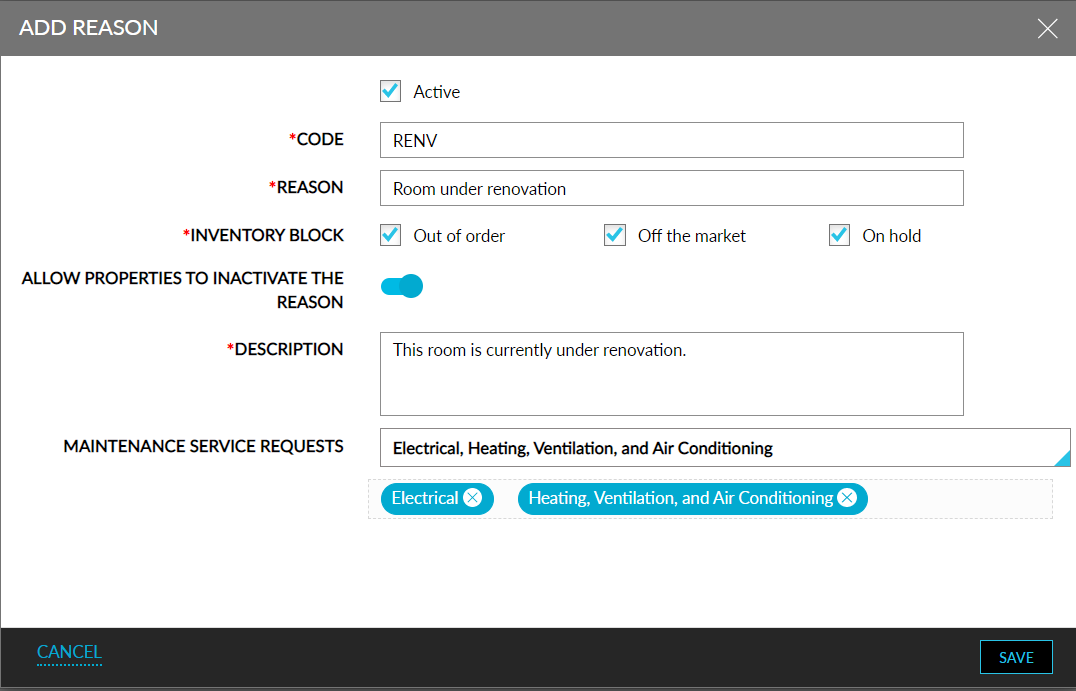
Click Add. The Add Reason screen will be displayed.
Refer to the following table and enter the values for the fields:
|
Field |
Description |
|---|---|
|
Active |
|
|
Code |
The code for the reason. A maximum of 20 characters can be entered. |
|
Reason |
The reason for creating inventory blocks/maintenance requests. A maximum of 64 characters can be entered. |
|
Inventory Block |
Users can select one or more of the following options:
|
|
Allow Properties to Inactivate the Reason |
|
|
Description |
The description for the reason. A maximum of 200 characters can be entered. |
|
Maintenance Service Requests |
A multi-select drop-down list that allows users to select one or more maintenance service requests available at the property. |
Click Save.